Those two core flags are useful, and Views understands them, but there are only two. The moment a site needs a "Featured" flag for one section and a "Homepage hero" flag for another, you end up repurposing sticky or adding a boolean field to each content type.
The field route works, and Views picks up a boolean field with no extra setup. But it puts a promotion decision in the main column of the edit form, below the title and the body. A publishing option belongs where core keeps Promoted and Sticky, in the sidebar beside the content and not in it.
Publishing Options is a contributed module on drupal.org that lets you define as many publishing options as you want, attach each one to the content types that need it, and use them in Views as fields, filters and contextual filters. It works on Drupal 10 and Drupal 11. This post is the story of how it came about and a walkthrough of how to use it. The last section is for developers who want to see how it is built.
How it started
The module began on a Drupal 7 to Drupal 8 migration project. The site relied on Custom Publishing Options, which had not been ported to Drupal 8 at the time, so I took on the task of writing a custom module that did the same job for Drupal 8.
A few months later I checked back to see whether the original had made the move. To my surprise it had not. So I started a side project, a new contributed module built for Drupal 8, and I have maintained it since, updating it for newer versions of Drupal as I find the time.
Custom Publishing Options has since caught up. It supports Drupal 10 and Drupal 11 today, and it is a good module. Drupal is a community, not a contest, so if you need custom publishing flags you have two options to choose from, and I would rather you pick the one that fits your site than the one with my name on it. What follows is how mine works.
Where it is today
The module has been on drupal.org since July 2019. The first releases supported Drupal 8 and Drupal 9. A 2.x line followed at the end of 2021 and carried the module through Drupal 10, and its last release is still available for sites that need it. Version 3 added Drupal 11 support, and the June 2026 release candidate cleaned up the data model and brought the block submodule up to parity with the main module.
As of October 2026, drupal.org reports 70 sites using the module, and a Drupal 12 compatibility issue is already in the queue.
Looking back, what the module taught me most was the process of getting a contributed module into Drupal. I had to set up the project page, cut releases, work the issue queue, and follow the coding standards and the CI that checks them.
Along the way I also learned how Drupal works underneath, what I like to call the Drupal guts, meaning forms, the database layer, the hook system and Views plugins. A big part of that was Drupal 8, since the move to object-oriented PHP and Symfony changed how the whole system worked compared to Drupal 7’s procedural PHP and hook framework. I learned a lot, and I am still learning every time a new core version lands.
Installing it
Add it with Composer and turn it on like any other module.
composer require drupal/pub_options
drush en publishing_options
Or enable "Publishing options" on the Extend page. The module adds one permission, "Administer publishing options", and it is marked as restricted, so give it only to the people who should define the options. Editors do not need it to tick the boxes on their content.
Creating a publishing option
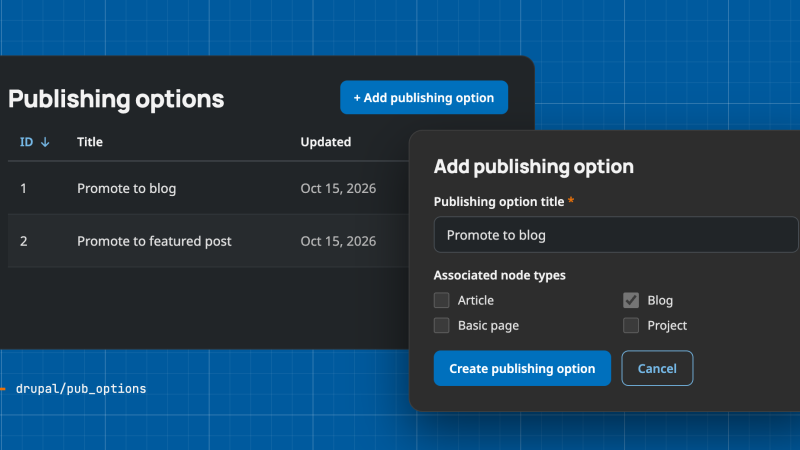
Go to Configuration, Content authoring, Publishing options, at /admin/config/content/publishing-options, and click "Add publishing option". The form asks for two things.
- "Publishing option title", the name editors will see, for example "Featured Article".
- "Associated node types", where you tick the content types that should get this option.
Click "Create publishing option". The list page shows every option with its title, when it was last updated, and Edit and Delete links. That is the whole definition. An option is a title plus the content types it applies to. No fields, no bundles, nothing else changes about your content model.
You can also attach options from the other side. Go to Structure, Content types, click Edit on the type, and look under Publishing options, the same place core keeps Published, Promoted to front page and Sticky. Each option you have defined appears there as a checkbox. Tick it and save, and the option applies to that type.
Setting it on content
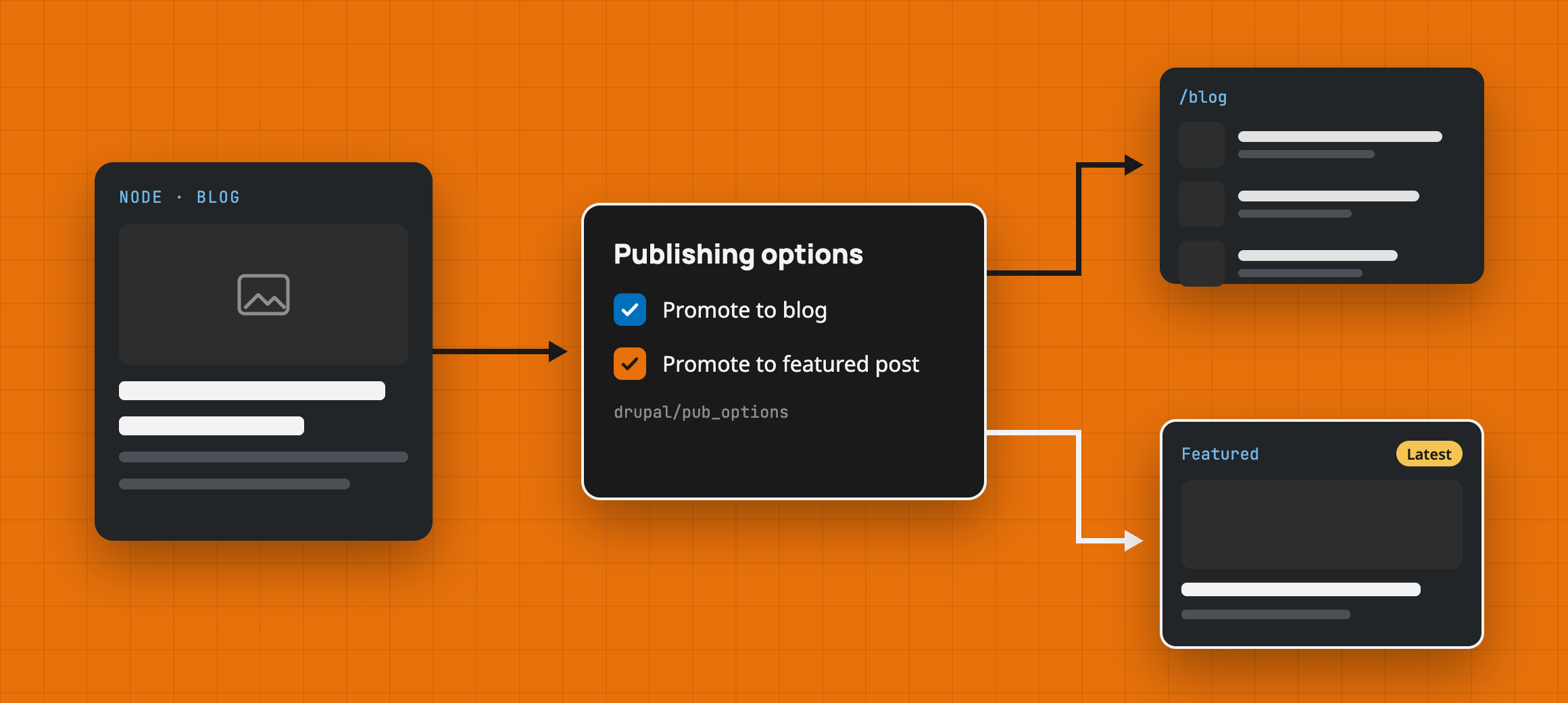
From then on, every node of those types gets a checkbox per option on the edit form, inside the Promotion options group next to Promoted to front page and Sticky at top of lists. Check it and save, and the node is promoted for that option. Uncheck it and save, and it is not. The option is a flag on the side of the node, which is exactly what core's promote and sticky flags are.
Using it in Views
Views is where the options pay off. Every option you define shows up in the Views UI under Content, named after the option's title, and it shows up three times.
- as a field, which prints Yes or No for each row,
- as a filter, with one operator, "Is promoted to", and Yes or No as the value,
- as a contextual filter, which takes
1in the URL for promoted and anything else for not promoted.
So a "Featured articles" view is a Content view with two filters, Content type is Article and Featured Article is promoted to Yes. To list the articles that are not featured, set the same filter to No. A contextual filter lets one view serve both lists. Add the option as a contextual filter and /articles/featured/1 returns the promoted nodes.
A "Publishing options" relationship also sits under Content, for the rare view that needs to join the association table directly. Most views will not need it.
Publishing options block sub-module
Custom blocks get the same treatment through a submodule, Publishing Options Block. Enable it and block types get the option checkboxes, block content gets the flags, and Views gets a matching field, filter, contextual filter and relationship for block content.
The block features described here need Publishing Options 3.1.0-rc1 or later.
If you try it, the issue queue on the Publishing Options project page is the place for bugs and ideas. And if Custom Publishing Options turns out to be the better fit for you, that is a good outcome too.
Under the Hood
Everything above is all a site builder needs. The rest is for developers who want to know how the module is built and why.
Three tables, no fields
The module keeps its data in three plain database tables rather than config entities or fields.
publishing_optionsholds the option definitions, each with an id, a title and timestamps.publishing_options_bundlesmaps an option to a bundle and an entity type.publishing_options_option_nodemaps an option to a node.
The rule for that last table is simple. A row exists only while the option is checked. Checking the box does an idempotent merge. Unchecking deletes the row. So the row’s presence is the selection. The module calls this “presence = selected”, and it is why the table has no selected column. That keeps the table small and turns the Views queries into a question of whether a joined row exists.
Before 3.1 the table had that column, and unchecking an option wrote a row with selected = 0 instead of removing it. The 3.1 update deletes those leftover rows and drops the column. Run drush updb after you update.
One service, two extended forms
A single service, publishing_options.content, does all reads and writes, which keeps the forms thin. The module swaps in its own form classes for the node and node type entities through hook_entity_type_alter(), extends core's NodeForm and NodeTypeForm, and adds its checkboxes on top of what core already renders. That is why the options land in core's own Promotion options and Publishing options groups instead of a group of their own.
Deleting an option goes through the same service. It removes the definition, its bundle rows and its node rows, then fires hook_publishing_option_delete() so other modules can clean up their own tables.
The Views handlers
The integration lives in hook_views_data_alter(). For each option, the module registers a filter and a contextual filter under node_field_data and a field under node, keyed by a machine name made from the option's title. "Featured Article" becomes featured_article. It also adds the "Publishing options" relationship from content to the association table.
All three handlers work the same way. They add a LEFT JOIN from node_field_data to publishing_options_option_node, with the option id as an extra join condition, and then test whether the joined nid is NULL. This is what the filter does.
if ($this->value == 1) {
  $this->query->addWhere('AND', $alias . '.nid', NULL, 'IS NOT NULL');
}
else {
  $this->query->addWhere('AND', $alias . '.nid', NULL, 'IS NULL');
}
This is the "Featured articles" filter in exported config.
filters:
  featured_article:
    id: featured_article
    table: node_field_data
    field: featured_article
    plugin_id: publishing_options_filter
    value: '1'
Getting "not promoted" right
One detail I had to get right in 3.x was the “No” side of the filter. Since an unchecked option has no row at all, “No” cannot mean “a row with selected = 0”. It has to mean “no row for this option”. The filter and the contextual filter join only that option’s rows and check for a missing one with an IS NULL test.
The kernel tests confirm the check is per option. Filtering “No” on one option returns every node without that option, and a node checked for a different option still shows up in that list, because it is still unchecked for the one being filtered.
This is how the filter builds the join.
$configuration = [
  'type' => 'LEFT',
  'table' => 'publishing_options_option_node',
  'field' => 'nid',
  'left_table' => 'node_field_data',
  'left_field' => 'nid',
  'operator' => '=',
  'extra' => [
    ['field' => 'pubid', 'value' => $pubid, 'operator' => '='],
  ],
];
The extra condition limits the join to the rows for this one option. A node that has only other options finds no match, so its joined nid comes back NULL, and the IS NULL test lets it through.
Hooks stay in the .module file
I put the hook_views_data_alter() implementation in the .module file, not in a .views.inc file. Drupal 11.2 deprecated hooks in include files and Drupal 12 removes them. I wanted to keep things tidy, so I went with what is already backwards compatible and works on newer Drupal versions. Plain hooks like this one are still supported; Drupal expects to drop them in Drupal 13 at the earliest.
This is the start of the implementation, trimmed.
function publishing_options_views_data_alter(array &$data) {
  // ...
  $publishing_options = $publishing_options_service->getPublishingOptions();
  // ...
  foreach ($publishing_options as $publishing_option) {
    $machine_name = $publishing_options_service->getMachineName($publishing_option->title);

    $data['node_field_data'][$machine_name] = [
      // ...
      'filter' => [
        // ...
        'id' => 'publishing_options_filter',
        'pubid' => $publishing_option->pubid,
      ],
      // ...
    ];
    // ...
  }
}
For each option, it adds the filter, the contextual filter and the field to Views' data, keyed by that machine name.
The block submodule
Publishing Options Block uses the entity_type column in the bundles table to tell block types from content types, registers its own field, filter, contextual filter and relationship on the block content base table, and listens to hook_publishing_option_delete() to drop its own rows when an option is removed.
What changed in 3.x
Getting to 3.0.0 on Drupal 11 meant working through deprecations, among them database Merge::keys() calls that had to take an array, check_markup() replaced with the filter API, RESPONSIVE_PRIORITY_LOW gone, and Views plugin methods whose visibility had to change. It also added primary keys to both association tables, which MySQL's READ-COMMITTED isolation level needs.
3.1.0-rc1 finished the “presence = selected” data model on both the node and block sides, as described under “Three tables, no fields”, with update hooks that drop the old selected column and repair schemas on sites that came from 2.x.
The same release brought the block submodule's Views support up to parity with the main module, moved the forms and services onto dependency injection, fixed PHP 8.4 implicit nullable warnings, and added six kernel test classes covering the service, the node form and the Views handlers. The code passes phpcs against the Drupal standard, and the repo runs the Drupal Association's GitLab CI template.
That is the whole module. If you read this far and spot something I got wrong, the issue queue is open.
Sources
- Publishing Options: the module on drupal.org
- Custom Publishing Options: the alternative module
- README.md: install steps and how it works
- Releases for Publishing Options: version history
- hook_entity_type_alter: how the module adds its options to the edit form
- hook_views_data_alter: how it plugs into Views
- Includes for hook_hook_info implementations have been deprecated: why the hook lives in the .module file
- Support for object oriented hook implementations: plain hooks and their expected removal in Drupal 13
Comments.
No comments yet. Be the first to write one.